If you’re a student and thinking about admission in AIOU chances are your school, college, or university has asked you to “check the CMS portal” at least once. Maybe it was for an assignment deadline, an exam date sheet, or your latest grades. But what exactly is a AIOU CMS portal, and how does it work? Most of the time AIOU e-learning portal is working smoothly to help out the students in academic activites.
This guide breaks it down in simple, everyday language — no tech jargon, just clear answers. By the end,= you’ll know how to log in, submit assignments, check exam results, track attendance tutors information and get in touch with support whenever you’re stuck visit dashboard about CMS Portal of Aiou and know about your personal iformation of academic degrees.
🎓 AIOU CMS Portal — Complete Student Dashboard
A complete guide to Allama Iqbal Open University's Oracle-based CMS Portal — login, every dashboard section explained, and how to use each service.
🎓 AIOU CMS پورٹل — مکمل اسٹوڈنٹ ڈیش بورڈ
علامہ اقبال اوپن یونیورسٹی کے Oracle پر مبنی CMS پورٹل کا مکمل رہنما — لاگ ان کا طریقہ، ڈیش بورڈ کے ہر سیکشن کی تفصیل اور ہر سروس استعمال کرنے کا طریقہ۔
🔐 How to Login
- Visit the PortalGo to the official CMS/enrollment portal link below.
- Enter UsernameType your Registration Number as your User ID.
- Enter PasswordDefault password = last 2 letters of your name + last 4 digits of your registration number. Change it after first login.
- Sign InClick "Sign In" to open your dashboard with all sections listed below.
🔐 لاگ ان کیسے کریں
- پورٹل پر جائیںنیچے دیے گئے آفیشل CMS/انرولمنٹ پورٹل لنک پر جائیں۔
- یوزر نیم درج کریںاپنا رجسٹریشن نمبر یوزر آئی ڈی کے طور پر درج کریں۔
- پاس ورڈ درج کریںڈیفالٹ پاس ورڈ = نام کے آخری 2 حروف + رجسٹریشن نمبر کے آخری 4 ہندسے۔ پہلی لاگ ان کے بعد اسے تبدیل کر لیں۔
- Sign In کریں"Sign In" پر کلک کریں، نیچے دیے گئے تمام سیکشنز والا ڈیش بورڈ کھل جائے گا۔
📚Academic Recordsتعلیمی ریکارڈ▶
View your complete admission status, enrollment/course history, and current semester registration status.
یہاں آپ اپنی داخلہ کی حیثیت، کورس ہسٹری اور موجودہ سمسٹر کی رجسٹریشن کی حالت دیکھ سکتے ہیں۔
👤Profileپروفائل▶
Check and update your contact number, email and address. CNIC or qualification changes usually need Regional Office approval.
یہاں آپ اپنا رابطہ نمبر، ای میل اور پتہ اپ ڈیٹ کر سکتے ہیں۔ شناختی کارڈ یا قابلیت میں تبدیلی کے لیے ریجنل آفس سے رابطہ درکار ہوتا ہے۔
📝Course Registrationکورس رجسٹریشن▶
Select your semester, click "Add New Request," choose your courses, and submit. Compulsory courses are pre-selected; add electives as needed.
اپنا سمسٹر منتخب کریں، "Add New Request" پر کلک کریں، کورسز منتخب کریں اور رجسٹریشن جمع کروائیں۔
📦Mailing Books Trackingکتابوں کی ٹریکنگ▶
Track your course books through AIOU's Delivery Tracking System (DTS) — see whether they're dispatched or delivered.
اس سیکشن سے کتابوں کی ترسیل کی صورتحال (DTS) چیک کریں کہ کتابیں بھیجی گئیں یا موصول ہوئیں۔
🏫Campus Personal Infoکیمپس معلومات▶
Additional personal and academic details held by the university on record, separate from your main profile, used for verification.
یہ یونیورسٹی کے ریکارڈ میں موجود اضافی معلومات ہیں جو تصدیق کے مقاصد کے لیے استعمال ہوتی ہیں۔
📊Exam & Gradesامتحان اور نتائج▶
View semester-wise results. From Autumn 2021 onward, component-wise marks plus final grades are shown; earlier semesters show only final grades.
سمسٹر وائز نتائج دیکھیں۔ خزاں 2021 کے بعد تفصیلی نمبرز بھی نظر آتے ہیں، اس سے پہلے صرف حتمی گریڈ دکھائے جاتے ہیں۔
💳My Financial Accountمالی اکاؤنٹ▶
View fee challans, dues and payment history. Pay generated challans at Allied Bank (ABL) or via online banking.
فیس کے چالان، بقایاجات اور ادائیگی کی تاریخ دیکھیں۔ چالان الائیڈ بینک یا آن لائن بینکنگ سے جمع کروائیں۔
🔗Important Linksاہم روابط▶
Shortcuts to other AIOU services — Help Desk, Regional Offices list, complaint portal — all in one place.
ہیلپ ڈیسک، ریجنل آفسز کی فہرست اور شکایات پورٹل جیسے دیگر روابط یہاں دیے گئے ہیں۔
🎓Thesis Management Systemتھیسس مینجمنٹ▶
For MPhil/PhD students — manage supervisor communication, progress submission and thesis status tracking.
ایم فل/پی ایچ ڈی طلبہ کے لیے، سپروائزر سے رابطہ اور تھیسس کی پیش رفت یہاں دیکھی جا سکتی ہے۔
🛎️Student Service Requestسروس ریکویسٹ▶
Request transcripts, degree issuance or record corrections. Download the challan, pay at ABL, upload proof, and track via your service request number.
ٹرانسکرپٹ، ڈگری یا ریکارڈ کی درستگی کے لیے درخواست دیں۔ چالان جمع کروا کر رسید اپ لوڈ کریں اور سروس ریکویسٹ نمبر سے پیش رفت دیکھیں۔
📜Degree & Transcript Trackingڈگری اور ٹرانسکرپٹ▶
Download your unofficial transcript/DMC directly, and track official degree or transcript issuance request status.
غیر سرکاری ٹرانسکرپٹ ڈاؤن لوڈ کریں اور ڈگری/سرکاری ٹرانسکرپٹ کی درخواست کی حیثیت معلوم کریں۔
👨🏫My Tutorsمیرے ٹیوٹرز▶
See the tutor(s) assigned to evaluate your assignments per course, along with contact details for guidance.
آپ کے اسائنمنٹس چیک کرنے والے ٹیوٹر کی معلومات اور رابطہ نمبر یہاں دیے جاتے ہیں۔
❓ FAQs
Can new students access CMS immediately after admission?
Is the CMS Portal mobile-friendly?
What if I forget my password?
❓ اکثر پوچھے گئے سوالات
کیا نئے طلبہ داخلے کے فوراً بعد CMS استعمال کر سکتے ہیں؟
کیا CMS پورٹل موبائل پر چلتا ہے؟
پاس ورڈ بھول جائیں تو کیا کریں؟
🌟 Kashaan Academy — Your Complete AIOU Support Partner
From admission to degree — Kashaan Academy helps AIOU students at every step of their academic journey.
For ready-made solved assignments, visit solvedassignmentsaiou.com.
🌟 کاشان اکیڈمی — آپ کا مکمل AIOU سپورٹ پارٹنر
داخلے سے لے کر ڈگری تک — کاشان اکیڈمی AIOU طلبہ کی ہر مرحلے پر مدد کرتی ہے۔
تیار شدہ حل شدہ اسائنمنٹس کے لیے solvedassignmentsaiou.com وزٹ کریں۔
What Does ” AIOU CMS Portal” Actually Mean?
CMS usually stands for Campus Management System (sometimes called Course Management System or Content Management System existing in aiou depending on the institution). It’s essentially a digital hub where students teachers, and administrators handle everything related to academic life in one place.
Think of it as your school’s version of an online control panel. Instead of standing in long lines to submit forms or check notice boards for exam dates, everything happens through a single website or app. A CMS portal is closely related to what’s sometimes called a Learning Management System (LMS) or Student Information System (SIS) — the terms overlap, but the core idea is the same: centralize academic tasks so students and staff don’t have to rely on paper processes.
How Does a CMS Portal Work?
At a basic level, a CMS portal works like any secure website: you log in with your credentials, and the system shows you information and tools based on your role (student, teacher, or admin).
Step 1 — Logging In
Every student is usually given:
- A student ID or roll number
- A default password (often provided during admission, which you’re encouraged to change immediately)
You visit your institution’s AIOU CMS portal URL, enter these details, and you’re taken to your personal dashboard.
Tip: If you’ve forgotten your password, most portals have a “Forgot Password” option that sends a reset link to your registered email or phone number.
Step 2 — Navigating the Dashboard
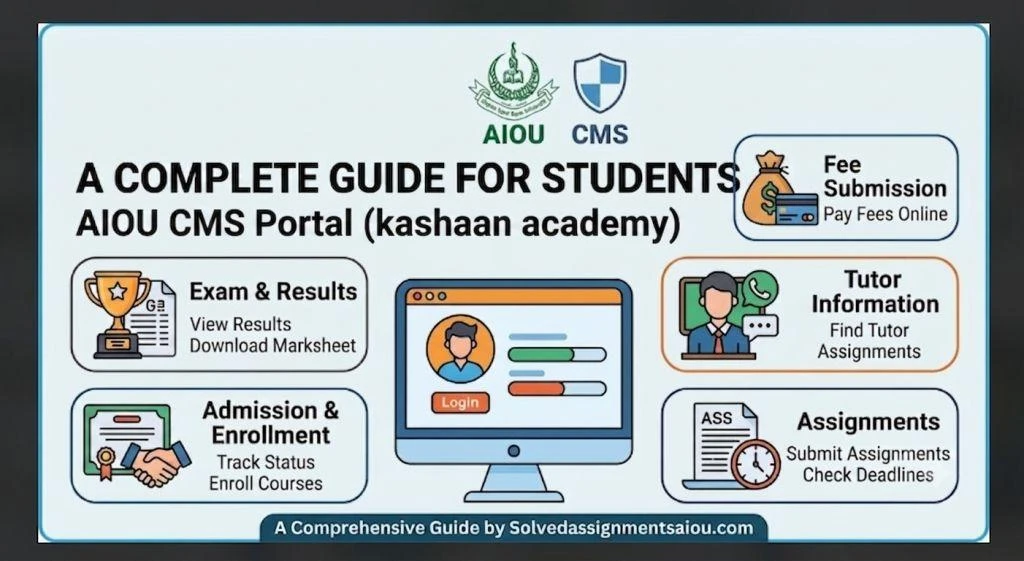
Once logged in, you’ll typically see a dashboard with menu options such as You can read:
- Assignments
- Exams / Results
- Attendance
- Fee Status
- Messages / Announcements
- Contact / Support
The layout differs slightly between institutions, but the general structure stays similar because most CMS platforms follow common design patterns for usability.
Step 3 — Using Portal Features Day to Day
From here, you can complete most academic tasks without ever visiting an office in person — submitting work, checking updates, or reaching out to staff when something’s unclear.
Key Features of a Student CMS Portal
Assignments
Most AIOU CMS portal portals let you:
- View assignment details and deadlines
- Upload files (Word docs, PDFs, images, etc.)
- Track submission status (submitted, pending, graded)
- See feedback or grades directly from your teacher
Why this matters: You no longer need to email files back and forth or worry about lost paperwork. Everything is timestamped, so there’s a clear record of when you submitted your work.
Exams and Results
The exams section usually includes:
- Exam schedules (dates, times, and venues or online links)
- Admit cards or hall tickets (downloadable)
- Result announcements once grading is complete
- Grade history or transcripts
Some institutions also use the portal for online exams, where you log in at a scheduled time to attempt tests directly on the platform.
Attendance Tracking
Many portals show your attendance percentage in real time, so you always know where you stand — helpful since most institutions have minimum attendance requirements to sit for exams.
Getting in Touch (Support & Helpdesk)
If something isn’t working — a wrong grade, a login issue, or a general question — CMS portals usually offer a few ways to reach out:
- A support ticket system where you describe your issue and get a tracked response
- A helpdesk email or phone number
- A live chat option (on more advanced portals)
- Announcements or notice boards for general updates from the administration
It’s usually best to use the ticketing system for academic issues (like grade disputes) since it creates a written record, and to use phone or chat for urgent, time-sensitive problems like exam-day login trouble.
Students are most commin searching on internet about CMS Portal Like:
- what is a CMS portal for students
- how does a CMS portal work
- student CMS portal login guide
- CMS portal for assignments and exams
- how to contact support on CMS portal and AIOU e-learning portal
- campus management system for students
- online student portal for exam results
Benefits of Using a CMS Portal
- Saves time — no more standing in queues for forms or results
- Reduces paperwork — everything is digital and easy to retrieve
- Improves transparency — grades, attendance, and deadlines are visible anytime
- Centralizes communication — announcements reach everyone at once
- Available 24/7 — check your status anytime, from anywhere
Common Problems Students Face (and Quick Fixes)
| Problem | Quick Fix |
| Forgot password | Use the “Forgot Password” link on the login page |
| Assignment upload fails | Check file size/format limits; try a different browser |
| Portal is slow or not loading | Clear browser cache or try during off-peak hours |
| Wrong attendance shown | Contact your class teacher or raise a support ticket |
| Can’t find exam schedule | Check the “Announcements” or “Notices” section first |
Tips to Get the Most Out of Your CMS Portal
- Change your default password right after your first login for security in any semester.
- Bookmark or save in browser the portal URL so you don’t waste time searching for it each time when you search out.
- Turn on notifications (email/SMS) if the portal offers them so you never miss a deadline or visit our site.
- Check the portal regularly keep in mind don’t wait for reminders announcements are often posted once.
- Keep proof of submission at the top — screenshot and paste in a file or save the confirmation after uploading assignments.
A CMS portal is designed to make academic life simpler — for students, teachers, and administrators alike. Once you’re familiar with its layout, tasks like submitting assignments Apply for Degree checking exam schedules, tracking attendance, and reaching out to support become quick and hassle-free.
If you’re new to your institution’s AIOU CMS portal take a few minutes to explore each section before you actually need it. That way, when a deadline is approaching, you’ll already know exactly where to go.
Have a specific question about your institution’s CMS portal or AIOU e-learning portal ? Reach out to your student helpdesk or support team listed on your portal’s login page for the most accurate, up-to-date guidance.