
Introduction
Navigating the administrative processes of Allama Iqbal Open University (AIOU) can be tricky, especially when dealing with course failures or exam issues. If your result shows FER1, FER2, or Reappear also you can read this post in urdu bellow you need to follow specific steps to clear these hurdles and continue your degree. Below is a comprehensive, guide on what these terms mean and how to pay the required fees via the CMS Portal. lets Know about AIOU FER1 FER2 fee payment in this post.
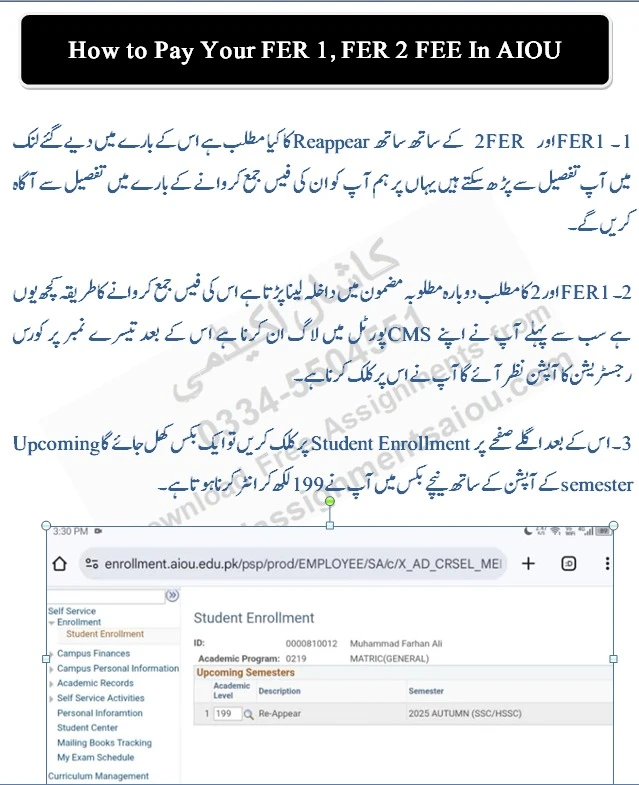
1. Understanding FER1, FER2, and Reappear
Before proceeding with the payment, it is crucial to understand why these codes appear on your transcript:
-
Fail in Result: This occurs when a student fails the final exam and you must take re admission with fee and assignments exams and workshop must be attempt again after re admission on that specific subjects. You are allowed to retake the exam in the next semester without re-enrolling in the whole course.
-
FER1 & FER2 (Full Exam Re-enrollment): TFER1 and FER2 indicate an exam failure. You are not required to resubmit assignments; you only need to deposit the reappear fee and clear these subjects by appearing in the exams during your next semester. You can also read Re-Reappear policy of AIOU. This policy is basically define the AIOU FER1 FER2 fee payment process.
2. Step-by-Step Guide to Paying FER1 & FER2 Fees
To re-enroll in a subject where you received an FER status, follow these steps on the AIOU CMS Portal:
- Login: Access your CMS Portal using your User ID and Password.
- Course Registration: On the main dashboard, locate and click the “Course Registration” icon (usually the third option).
- Student Enrollment: Click on the “Student Enrollment” link. A new window will open.
- Academic Level Search: In the box labeled “Academic Level” (next to the lookup icon), type 199 and press Enter. This code is specifically used for additional or failed semester enrollments.
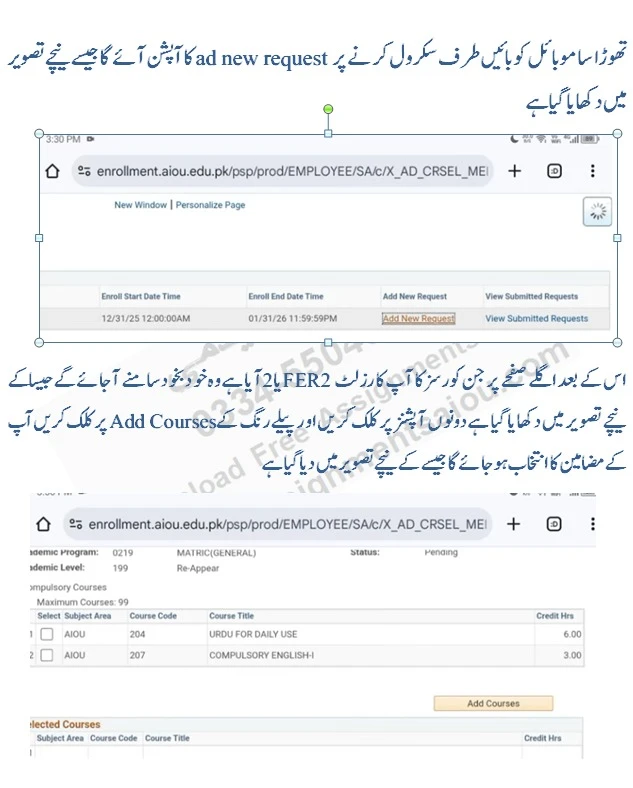
- Add New Request: Scroll the screen to the left (especially if using a mobile device) to find the “Add New Request” button and click it.
- Subject Selection: The portal will automatically display the courses marked as FER1 or FER2. Select the relevant subjects and click the yellow “Add Courses” button.
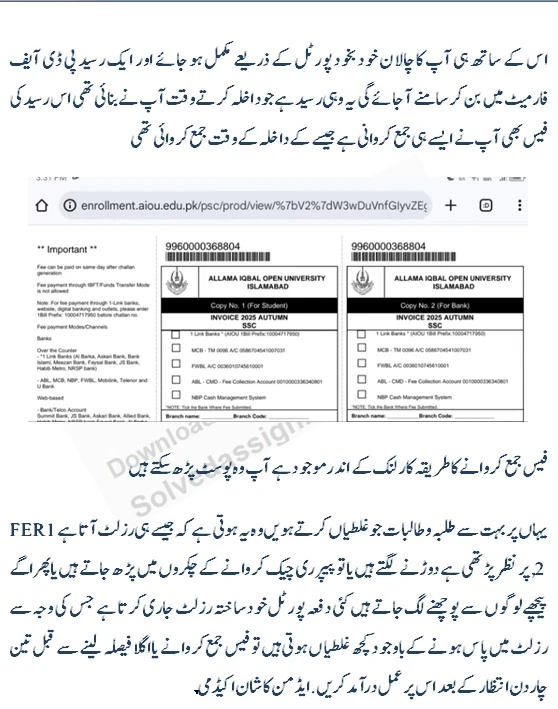
- Generate Challan: Once selected, click “Submit” and then “Print Invoice.” A PDF fee challan will be generated.
3. Payment Methods
You can pay the generated challan through the following channels:
- Mobile Apps: JazzCash, Easypaisa, or Upaisa.
- Bank Branches: ABL, MCB, FWBL, or UBL.
- Online Banking: Using the 1-Bill invoice number provided on your challan.
4. Important Advice: Don’t Rush!
Many students panic as soon as they see FER1 or FER2 on their result. Keep these tips in mind:
- Wait for Final Updates: Sometimes the portal issues an automated result that contains temporary errors. Wait 3 to 4 days after the result announcement before paying the fee to ensure the result is finalized.
- Paper Rechecking: Rechecking rarely changes an FER status unless there was a massive technical error. Re-enrollment is usually the faster path to completing your degree AIOU FER1 FER2 fee payment.
5. Dealing with UMC (Unfair Means) Cases inAIOU
If your FER status is due to a UFC Unfair Means case (cheating or plagiarism), the process is different:
- Submit the Form: Fill out the required explanation form and mail it to the address provided at the top of the document.
- University Hearing: AIOU will summon you to the main campus on a specific date to appear before a committee.
- The Committee Meeting: Be polite and honest. If a mistake was made, it is better to admit it and submit a written apology.
- Consequences: Usually, the committee allows you to re-enroll in the affected subject(s). However, you cannot take further exams or enroll in new semesters until this case is officially resolved.
Note: Always keep a copy of your paid challan and any correspondence with the university for your records. For further assistance, stay connected with recognized academic portals or the AIOU helpdesk.